Green pipeline, wrong numbers: data quality at every layer
A pipeline that ran is not a pipeline that is right. Part 2 of a series on data foundations for enterprise AI: the checks that run at every layer, the SLA on the gold layer, and who gets told when something breaks.
On this page 9 sections
TL;DR
- A pipeline can finish green while the numbers are wrong. Put checks where data can go wrong: at the source, after every transformation, on the gold layer, and at delivery.
- Three checks run on every source, always: freshness against an expected arrival time, volume against a same-weekday baseline, and primary-key uniqueness (the whole table if it is small, the partitions you just wrote plus a cross-partition pass if it is large).
- After each transformation, test that the grain is the one you declared. Decide up front whether a model keeps, blows out or aggregates its grain, then check row counts and conserved totals.
- On the gold layer, test the business logic: invariants, reconciliation to the system of record and plausible ranges. Send a daily DQ report, and check gold was ready by the agreed SLA, with an at-risk alert before the miss.
- Every failure is either blocking or a warning, and either way a named person is told and escalation follows. An agent can diagnose from the trace; it never replaces that person.
Data Foundations for Enterprise AI — Part 2 of 3
In Part 1 we built the plumbing. Every channel’s data lands automatically, gets cleaned in staging, joined in intermediate models and served from a thin gold layer. Every morning the orchestrator turns green.
Green means the jobs ran. It doesn’t mean the numbers are right.
The failures that hurt are the quiet ones. A marketplace report comes back half empty and the job loads it happily. A product mapping picks up a second row and revenue doubles for one SKU. Nothing errors. The dashboard looks plausible. Then an agent repeats the number to the CEO, with total confidence.
Here’s a story that stays with me. One team I worked with had about 9,400 dbt tests declared. Their data catalog showed every one of them passing, and had for about two and a half years. In fact more than 400 were failing every day. A documentation step ran after the tests and overwrote the results file, so the catalog only ever saw a clean slate. Of those 9,400 tests, 8 checked freshness. None checked volume.
So the number of tests tells you very little. What matters is where the checks sit, what they compare against, and who hears about it when one fails. This post is about all three.
Where the checks go
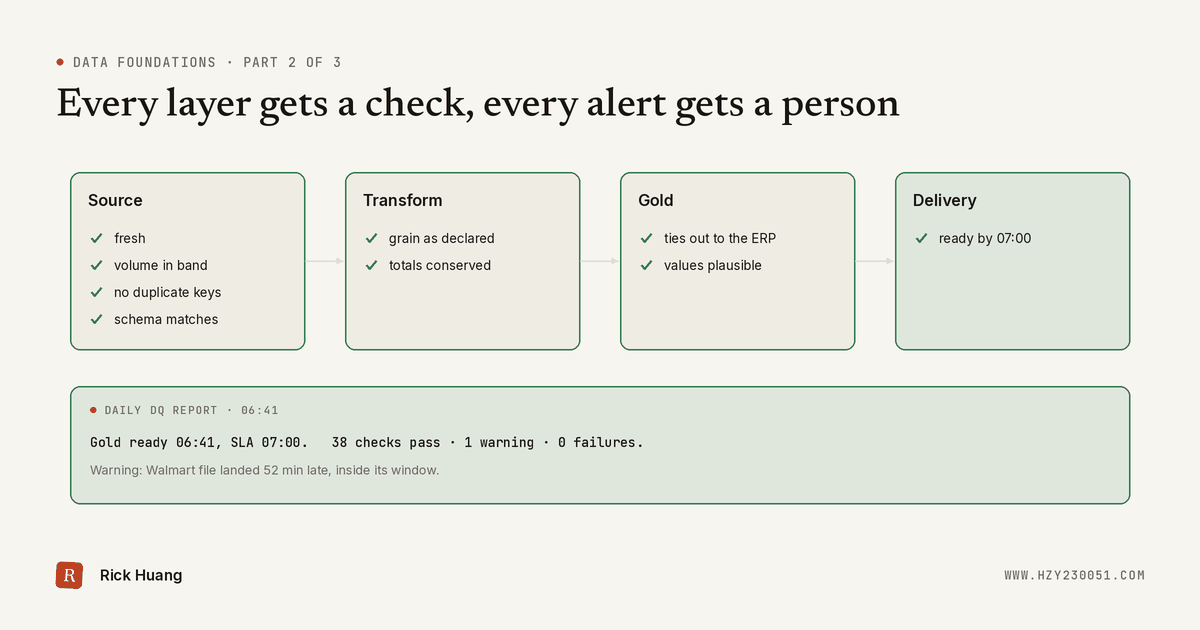
Data can go wrong in four places, so that’s where the checks go.
- At the source, before anything is built on it: did the data arrive, is there about the right amount of it, and is each record there once?
- After each transformation: did a join or mapping change the grain when it wasn’t meant to?
- On the gold layer: do the business numbers follow the rules, tie out to the system of record, and look plausible?
- At delivery: was gold ready, checked, by the time the business was promised it?
Underneath all four sits one rule. Every check is either blocking or a warning, and every failure reaches a named person. We’ll come back to that at the end, because it’s the part teams most often skip.
Standard checks at the source
Three checks run on every source, whatever it is and however it’s loaded. They’re cheap, they’re generic, and they catch most broken feeds before anything downstream gets built on them. Skip them for “simple” sources and those are the ones that will bite.
1. Freshness: did the data arrive?
Freshness asks one question: how old is the newest data I have, and is that older than I expected?
That needs two things you write down per source: when data is expected, and how late is too late. The ERP export lands by 01:00. Marketplace reports land by 03:00. A retail partner’s file arrives on Mondays. A single global “24 hours” rule fits none of them.
Measure two timestamps, because they fail differently:
- Load time (
_loaded_at) tells you whether your pipeline ran. - Event time (the latest order or update timestamp in the data) tells you whether the source sent anything new.
If load time is fresh and event time is stale, the pipeline ran fine and loaded nothing new. That’s the case most monitors miss.
In dbt this is a few lines of source config:
sources:
  - name: amazon_sp_api
    loaded_at_field: _loaded_at
    freshness:
      warn_after: { count: 4, period: hour }
      error_after: { count: 8, period: hour }
    tables:
      - name: orders
Set the thresholds from how the source really behaves. One hourly feed I helped tune built at :40, tested at :55 against a 30-minute rule and fed a report at :00. Normal age at test time was 8 to 13 minutes, which left real headroom without hiding a missed build. A rule that never fires on a normal day and always fires on a bad one is the whole goal.
2. Volume: is there about the right amount?
Say a feed sends 100k rows on Monday, 90k on Tuesday and 50k on Wednesday. Is Tuesday a problem? Is Wednesday?
The simplest rule compares today with yesterday. It fails in both directions. Weekends are normally 30% lower than Fridays, so it pages someone every Saturday. And a feed that loses 10% a day for a week never trips a 20% day-over-day rule, even though it’s down by half.
So compare each day to the same weekday in recent weeks, not to yesterday.
A practical rule set:
- Expected band: the average of the last four same weekdays, plus or minus a tolerance you tune per source (12% here).
- Hard floor: zero rows always fails, whatever the band says.
- Per segment, not just in total: count per marketplace, region or store too. A total can look fine while one marketplace sends nothing.
- Known events: promotions, holidays and launches move volume on purpose. Keep a small calendar of them, or the check will page on your biggest sales day.
In SQL, with a date spine so a missing day counts as zero instead of vanishing:
with spine as (
  select d from unnest(generate_date_array(date_sub(@run_date, interval 35 day), @run_date)) as d
),
daily as (
  select s.d, count(o.order_id) as n
  from spine s
  left join staging.amazon_orders o on date(o.purchase_date) = s.d
  group by s.d
),
scored as (
  select d, n,
    (lag(n, 7) over w + lag(n, 14) over w + lag(n, 21) over w + lag(n, 28) over w) / 4 as baseline
  from daily
  window w as (order by d)
)
select d, n, baseline, safe_divide(n, baseline) - 1 as deviation
from scored
where d = @run_date
  and (n = 0 or abs(safe_divide(n, baseline) - 1) > 0.12)
Observability tools such as Elementary or a commercial platform will learn these bands and seasonality for you. Use them if you have them. The point is the comparison, not the tool.
3. Duplicates: is each record there once?
Every source in Part 1 got a written unique key. This check holds it to that.
Small tables: check the whole table. If it’s a few million rows, one query does it:
select
  count(*) - count(distinct order_line_id) as duplicate_rows,
  countif(order_line_id is null)           as null_keys
from staging.amazon_order_lines
Note the null count. count(distinct ...) ignores nulls, and so does dbt’s built-in unique test, so a key that’s null on a thousand rows passes a uniqueness check. Test not_null alongside it.
Large tables: check the partitions you touched. Scanning billions of rows every run is slow and expensive. Check uniqueness inside each partition this run wrote, which on a daily load with a lookback window is a handful of days.
That leaves one gap. A per-partition check can’t see a key that shows up in two different partitions, and that’s exactly what late re-sends and lookback re-pulls produce.
So add a second pass: no key in the new partitions may already exist in an older one.
-- Pass 1: unique within each partition this run wrote
select load_date, count(*) - count(distinct order_line_id) as duplicate_rows
from staging.amazon_order_lines
where load_date >= date_sub(@run_date, interval 3 day)
group by load_date
having duplicate_rows > 0;

-- Pass 2: no new key already exists in an older partition
select n.order_line_id
from staging.amazon_order_lines n
join staging.amazon_order_lines o using (order_line_id)
where n.load_date >= date_sub(@run_date, interval 3 day)
  and o.load_date <  date_sub(@run_date, interval 3 day);
Pass 2 reads one column of history. If even that is too costly, bound it to a window you know late data can’t exceed, such as 90 days. Better still, make the load itself merge on the key, so the duplicate can’t be written in the first place, and keep the check to prove it.
One more detail: run this on the first table that’s supposed to be unique. Part 1 recommended re-pulling a lookback window, so an append-only raw table repeats rows by design. The check belongs on the staging model after the merge.
When it does fire, the causes are usually boring. In one review of about 15 duplicate root causes, the biggest was a file copy that wasn’t idempotent: it ran twice and loaded more than 600,000 rows of market data a second time. Others were append-only reloads with no dedupe step. The usual fix is to keep the latest version of each key:
qualify row_number() over (partition by order_line_id order by _loaded_at desc) = 1A fourth I’d add: the schema contract
Part 1 ended with a schema contract for every source: which fields you keep, their names and their types. Enforce it here. In dbt, contract: {enforced: true} on staging models fails the build if a column disappears or changes type. A useful split: contracts guarantee shape, tests guarantee content. A dropped column should fail loudly at the door, not show up three layers later as a column of nulls.
After every transformation: did the grain change?
Grain is what one row means: one row per order line, per SKU per day, per customer. Staging shouldn’t change it. Intermediate models, with all their joins and mappings, are where it changes by accident.
The fix starts before you write any SQL. For every model, write the grain down as “one row per ___”, and decide which of three things the model is meant to do:
| The model… | Example | Rows out vs in | What to test |
|---|---|---|---|
| Keeps the grain (enrich) | Order lines + product attributes | Equal | Unique at the grain, row count in = out, measures conserved |
| Blows out the grain (explode) | Orders → order lines, bundles → components | More, by a known rule | Unique at the new, finer grain; children sum back to the parent |
| Aggregates the grain (roll up) | Order lines → SKU per channel per day | Fewer | Unique at the coarser grain; totals equal the detail |
The dangerous case is a model that was meant to keep its grain and silently blew it out. One stale row in a mapping table is enough:
The joined result looks perfectly reasonable row by row. Only three checks catch it:
- Uniqueness at the declared grain.
uniqueonorder_line_id, orunique_combination_of_columnsfor a composite grain. - Row count in versus out. For a model that keeps its grain, they must match exactly.
- Conservation of measures. Sum revenue and units before and after the join. If the model doesn’t mean to change them, the totals must not move.
Watch the opposite failure too. An inner join to a mapping table silently drops every row that has no match, such as a brand-new listing nobody has mapped yet. A relationships test, plus a count of unmatched rows, turns “missing” into a visible number.
Two habits make this stick. First, put the before-and-after evidence in every pull request that touches a model: row counts, key uniqueness, and one business metric before and after. Second, when a uniqueness test fails, check the test as well as the data. In that same review, several “duplicates” were tests asserting a grain the model never had. That’s still a bug, just in the documentation.
On the gold layer: are the numbers right?
Source checks ask whether the data arrived intact. Grain checks ask whether the plumbing kept it intact. On the gold layer the question changes: are these the right business numbers, and do they make sense?
Three kinds of test do most of the work:
| Kind | What it asks | Example |
|---|---|---|
| Invariants | Rules that are true by definition | Net = gross − discounts − refunds. Units sold ≥ 0. Sell-through ≤ 100%. |
| Reconciliation | Does it tie out to the system of record? | Gold net revenue by day and channel within 0.5% of the ERP |
| Plausibility | Is it within a sensible range? | Average selling price within ±30% of its 8-week average. No channel’s share moves 20 points in a day. |
Invariants and reconciliation are usually blocking. If gold doesn’t tie out to the ERP, it’s wrong, and a late answer beats a wrong one. Plausibility checks are usually warnings: a real promotion can move a price, and a person should look before anything is held.
Reconciliation is the one teams skip and shouldn’t:
select g.order_date, g.channel, g.net_revenue, e.net_revenue as erp_net_revenue
from gold.fct_channel_sales_daily g
join staging.netsuite_revenue_by_channel_daily e using (order_date, channel)
where g.order_date >= date_sub(@run_date, interval 7 day)
  and abs(safe_divide(g.net_revenue - e.net_revenue, e.net_revenue)) > 0.005
Set the tolerance with finance, not alone. Some gaps are timing, like a refund the ERP books a day later, and finance knows which ones are expected.
Report it, every day
Then tell people. Every morning, after gold is built and checked, send a short DQ report to the people who use the numbers, in the channel they already read:
Gold ready 06:41 ET (SLA 07:00) · 38 checks passed · 1 warning · 0 failures
Warning: Walmart store file arrived 52 min late, inside its window. No action.
Held: none.  Open issues: 1 (duplicate SKU mapping, owner: product-data, due Fri)
Send it on clean days too. If the report only shows up when something broke, silence is ambiguous: did nothing fail, or did the check not run? A dashboard of test results is useful for digging in, but people read the message, not the dashboard.
At delivery: did gold meet its SLA?
The last check isn’t about the data at all. It’s about time.
Agree the SLA with the people who use gold, before you need it. Something like: the previous day’s gold tables are built and checked by 07:00 ET on business days. Then measure the time the checks passed, not the time the job finished. A table that finished on time and failed its checks didn’t meet the SLA.
Two things make an SLA useful rather than decorative:
- An at-risk alert. If a critical source still hasn’t landed by 05:00, you already know 07:00 is in danger. Say so then. Consumers can plan around a delay they hear about two hours early; they can’t plan around one they discover at 07:05.
- A track record. Log every day’s ready time and report attainment, such as 29 of the last 30 business days. That’s the number that tells you whether the pipeline needs work.
And monitor the monitor. A freshness metric emitted by the pipeline goes silent when the pipeline is down, and silence looks a lot like health. Alert on a missing signal as well as a bad one: “the check didn’t report in two hours” is an alert in its own right.
When a check fails: two kinds, one rule
A failed check leads to one of two things.
Blocking. The downstream models don’t run on bad data. Gold keeps serving the last build that passed, clearly marked with its date, and the owner is paged. Use this for anything that would put a wrong number in front of the business: a source missing or far outside its volume band, duplicate keys, a grain change, a broken invariant or reconciliation.
Warning. The pipeline carries on, the issue is flagged on the DQ report, and the owner gets a ticket. Use this for anything a person should look at but that doesn’t make gold wrong: a plausibility outlier, a non-critical column with more nulls than usual, a file that was late but inside its window.
Be choosy about what blocks. Remember the team with 400-plus tests failing daily: gating on “every test passes” would have stopped the pipeline forever. Start with a small, curated set of blocking checks you trust, and make everything else a warning until it earns promotion. When old failures pile up, sort them into four groups: real data issues, false positives, rules applied to the wrong model, and stale rules. Only the first group is about the data. The other three are about the checks, and fixing them is what makes people trust the alerts again.
Whichever kind it is, someone has to know. An alert that lands in a channel nobody owns is the same as no alert. The routing rules I use:
- Every model has a named owner, kept in the catalog next to the model, and the alert goes to that owner, not just to a team channel.
- The alert says what failed: the check, the table, the value against the threshold, and a link to the run. “dbt tests failed” is not an alert.
- Severity sets the clock. A broken gold table: acknowledged within 15 minutes, fixed or rolled back within 4 hours. Duplicates or nulls with partial impact: one business day. Everything else: three business days.
- No acknowledgement, escalate: to a secondary on-call, then to the team lead.
- One issue, one alert. Give every alert a fingerprint (check plus table plus cause), reuse the open ticket when it fires again, and don’t re-notify on a timer. One team I worked with found that more than half its alert posts were repeat notifications for issues already being worked.
- Match the alert to the rule. A freshness rule of 75 minutes is pointless if the alert only fires after three failed hourly runs. I’ve seen exactly that: about two and a half hours from the last good build to the first message.
Where an agent helps
This is a good place to put an agent to work. Every failed check leaves a trace: the failing query and its result, the run log, the model’s lineage, and the commits since it last passed. An agent can read all of that in a minute or two and post a diagnosis on the incident: “2 of 3 marketplace report jobs came back cancelled, re-request them”, or “the mapping table gained a second row for SKU-1001-CS in yesterday’s commit”.
That shortens the time to a fix a lot. But the agent attaches its diagnosis to an incident a person already owns. It doesn’t close the incident, mute the alert, or push a fix to production on its own. It’s the same line I drew in certifying data models with an agent: rules detect, a person decides, and the agent handles the reading in between.
What goes wrong in practice
- Checks nobody sees. Results go to a file, a tool or a channel that nobody reads. Check that a deliberately broken test actually reaches a person.
- Thresholds copied, not tuned. One freshness or volume rule for every source pages on quiet weekends and misses real gaps on busy days.
- Alert fatigue. Hundreds of chronic failures teach everyone to ignore the channel. Cut the noise before you add more checks.
- Rules that drift from reality. An
accepted_valueslist written last year rejects “$0-$99,999” because the form now drops the spaces. Review rules like you review code. - Counting the wrong environment. One alert review counted about 760,000 failing rows; in production it was about 17,000. The rest came from dev and staging. Filter by environment before you panic, or before you relax.
- Grain tests on the wrong grain. A uniqueness test on a key the model was never unique on fails forever and trains people to ignore it.
Where to start
If you have a pipeline and few checks, add them in this order. Each step is useful on its own.
- Freshness, volume and key uniqueness on every source, with thresholds set per source.
- A declared grain and a uniqueness test on every model, plus row-count and total checks on models that join.
- Three to five reconciliation and invariant tests on gold, agreed with finance, and the daily DQ report.
- The SLA, written down, with an at-risk alert and a monthly attainment number.
- Owners and escalation for every alert, then an agent to speed up the diagnosis.
Coming up in this series
Now the numbers arrive on time, at the right grain, and tie out to the ERP, and when they don’t, someone knows. What’s left is making sure everyone, people and agents alike, means the same thing by “revenue”.
Part 3: The semantic layer. One definition per metric, one owner, traceable lineage, and an agent that asks the semantic layer instead of guessing from table names. I made the general case in the semantic layer is the API for AI; Part 3 applies it to the multi-channel business from Part 1.
Found this useful? Pass it on