Before you build the agent: working backwards to your data pipeline
An agent is only as trustworthy as the numbers under it. Part 1 of a series on data foundations for enterprise AI: getting every channel's data in, and modeling it so it agrees with itself.
On this page 6 sections
TL;DR
- An agent is only as reliable as the numbers under it. Work backwards: agent, semantic layer, unified models, then every channel's data ingested automatically.
- Pick the ingestion pattern per source: custom pipelines for the ERP, job-style report pulls for marketplace APIs, managed connectors for commodity platforms, validated file drops for retail partners.
- Land unstable schemas raw in object storage first and load stable ones straight into the warehouse. Write down a cursor, a lookback window and a unique key for every source.
- Model in three layers (staging, intermediate, thin marts) and map every channel's product identifier back to the ERP record so sales and inventory compare at one grain.
- At one consumer-products company this replaced 24 to 32 analyst-hours a week of spreadsheet stitching with a three-hour automated daily cycle.
Data Foundations for Enterprise AI — Part 1 of 3
Every leadership team I talk to wants the same thing right now: one AI agent that can answer questions across the whole business. “How did our top SKUs sell on Amazon versus Walmart last week?” “Which products are about to run out of stock?”
The demo always looks easy. The hard part is underneath. As I wrote in data models agents can trust, an agent fills every gap in the data with a confident guess. If it reports one revenue figure on Monday and a different one on Tuesday, nobody uses it again.
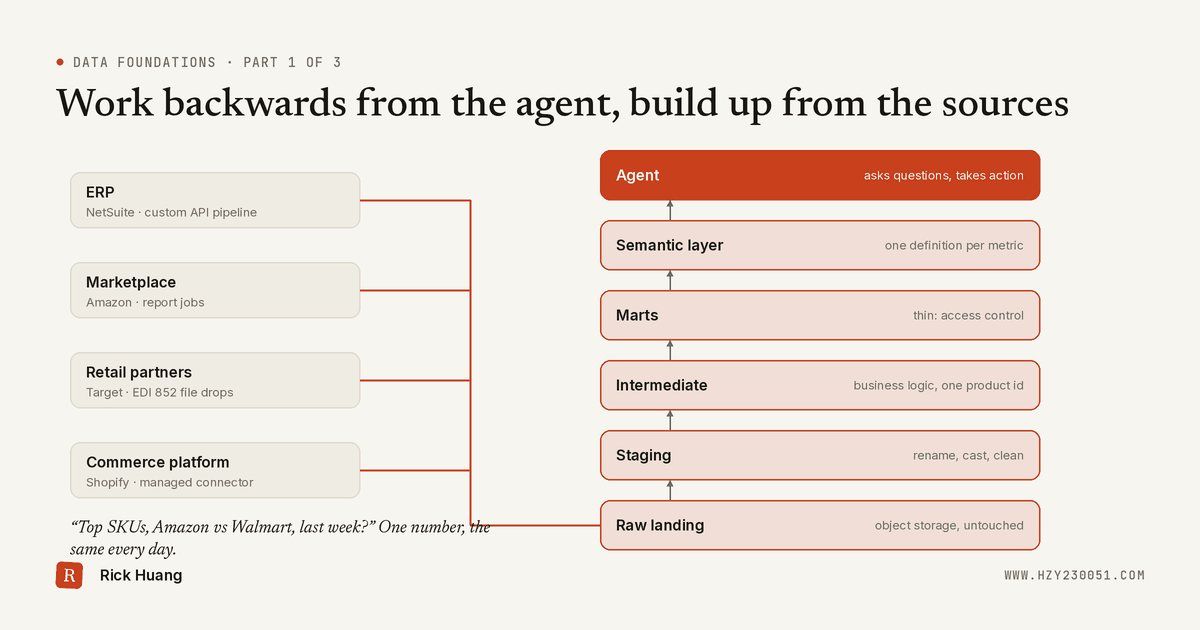
So let’s work backwards. An agent needs consistent metrics and clear context. That needs a semantic layer. A semantic layer needs clean, unified data models. And unified models need every channel and every subsidiary’s data pulled together, with as little manual effort as possible.
That foundation is a shared data platform that every business unit and every channel builds on. This is Part 1 of a three-part series, and it covers the bottom of the stack: getting data in and modeling it so it agrees with itself.
The agent sits at the top, but everything it says depends on the layers below. This post covers the bottom five; data quality runs across all of them.
Where most companies actually start
Before any architecture, look at how data moves today. Here’s a real example from a US consumer-products company I worked with.
They sold through Amazon, Shopify, TikTok Shop and Walmart, plus Target and other big retailers. Product master, inventory, purchase orders and finance lived in NetSuite, their ERP (enterprise resource planning system).
Every week, four analysts each spent six to eight hours downloading reports, cleaning them, reconciling the numbers and stitching them into one view. That’s roughly 24 to 32 analyst-hours a week, just to get to a weekly business review. By the time anyone looked at the numbers, they were already days old.
You can’t put an agent on top of that. You’d just be automating the confusion.
Step 1: Get the data in
There’s no single way to ingest data. Two questions pick the pattern: what kind of system is the source, and how stable is its schema? Here’s how that plays out across a typical e-commerce stack.
Fast-changing APIs and retailer files land raw in object storage first, then get parsed. Mature connectors write straight into the warehouse. The sections below go through each source type.
ERP systems: build a custom pipeline
The ERP is usually the system of record for products, inventory, purchase orders and finance, so it’s the source you most need to get right. Most modern ERPs expose an API. NetSuite, for example, offers REST endpoints and SuiteQL queries. You write a pipeline that calls it on a schedule and pulls what changed.
A few things bite almost everyone:
- Every company’s ERP is customized. Custom fields, custom record types and renamed statuses are normal. Expect to map them per company, not once per vendor.
- API limits are real. ERPs often cap concurrent requests. Batch your calls and back off on errors instead of hammering the endpoint.
- Deletes are invisible. Pulling “records modified since yesterday” never tells you what was deleted. Schedule a periodic full comparison of keys to catch them.
- Finance data gets restated. Closed periods get adjusted. Keep enough history to reload a whole period when that happens.
Marketplaces with their own APIs
Big marketplaces have rich APIs, but they behave differently from a simple database query. Amazon’s Selling Partner API is a good example. For many datasets you don’t fetch the data directly. You request a report, poll until it’s ready, then download the file.
Design the pipeline around that:
- Treat it as a job, not a call. Track each report request and its status, so a slow report doesn’t block everything else.
- Respect per-endpoint rate limits. They differ by operation, so one global throttle is usually wrong.
- Re-pull a lookback window. Orders get cancelled, refunds land later and settlements arrive days after the sale. Pulling only “yesterday” means your numbers drift. Re-load the last several days on every run and let the merge step overwrite what changed.
Managed connectors: buy before you build
For well-known platforms like Shopify, tools such as Fivetran and Stitch already maintain connectors. They handle authentication, pagination, API changes and schema updates, and write straight into your warehouse. Newer platforms like TikTok Shop may or may not be covered yet, so check before you plan around one.
My rule of thumb: buy for commodity sources, build for the rest. If a connector exists and covers the tables you need, use it. Your engineering time is better spent on the ERP mapping and business logic nobody can sell you.
The trade-offs to watch:
- Cost grows with volume. Many tools price by rows synced, so high-volume tables can get expensive fast.
- Coverage has gaps. A connector may skip the exact endpoint or field you need.
- You give up some control over sync timing and retry behavior.
Retail partners: EDI and SFTP file drops
Traditional retailers often share data through files, not APIs. A common one is the EDI 852 product activity message, which can carry store-level sales and inventory. Others send CSV or Excel files to an SFTP folder.
Files are simple, but they fail quietly. A few habits help:
- Archive every original file before you touch it, so you can always replay.
- Check the file before loading it: expected name pattern, expected columns, a sensible row count.
- Make loads idempotent. The same file sent twice should not double your sales.
Stable vs. unstable schemas: where data lands first
Whatever the source, the next decision is where the data lands, and that depends on how stable its schema is.
Stable schema: load straight into the warehouse. If fields rarely change, parse the data directly into a raw layer in the warehouse. This is exactly what managed connectors do.
Unstable schema: land it raw in object storage first. If fields appear, disappear or change type without warning, don’t fight that at ingestion. Save the untouched payload as JSON in a storage bucket such as Amazon S3, Google Cloud Storage or Alibaba Cloud OSS. Organize it by source and load date, and never edit it after writing.
That raw copy is your safety net. When a field changes shape, ingestion keeps working. You update the parsing step and replay the history from the bucket, instead of asking the source to send everything again.
Incremental loads and the schema contract
Reloading everything every day works until it doesn’t. For each source, write down three things:
- A cursor: the field that tells you what’s new, usually an updated timestamp.
- A lookback window: how far back to re-pull to catch late changes.
- A unique key: a natural key or a composite of several fields, so the merge step can update rows instead of duplicating them.
Then give every source a clear mapping to the schema your downstream models expect. Which fields you keep, what they’re renamed to, what type they should be. This contract is what lets the pipeline add, drop or rename fields on purpose instead of breaking silently. It’s also the first thing your data quality checks will lean on, which we’ll get to in Part 2.
Step 2: Model it in three layers
Inside the warehouse, I split the work into three layers. If you know the Medallion Architecture, the raw landing zone above is bronze, staging and intermediate together are silver, and marts are gold.
- Staging does standardization and cleaning only. Rename columns, cast types, fix time zones, trim junk. No business logic here, so every staging model is a faithful, tidy copy of its source.
- Intermediate is where the logic lives. You join entities across sources, apply business rules and map things together based on their cardinality. This is the layer that turns five versions of the truth into one.
- Marts (the gold layer) should be as thin as possible. Ideally they add little more than access control and row-level security on top of the intermediate models.
That last point is a deliberate choice. Keep the gold layer at the lowest level of granularity you can. When an analyst needs to dig into a specific order or SKU, you can open the mart to them without exposing anything they shouldn’t see, and without rebuilding a new table for every question.
The hard part: one product, many identities
Here’s what “map entities together” means in practice, and why it matters so much for an agent.
Take one product, say a 12-pack of 500 ml bottles. On Amazon it’s an ASIN plus a seller SKU. On Shopify it’s a variant ID. Walmart’s point-of-sale data calls it by its own item code. In the ERP, it’s a single product-master record. Some channels sell it by the case, others by the unit.
If you don’t reconcile these, “how many did we sell?” has a different answer in every system. So in the intermediate layer you map every channel identifier back to the ERP record, align pack size and unit of measure, and flag anything unmatched or conflicting for a human to review.
The mapping isn’t always one to one. One ERP item can have several listings, and packs need conversion rules the business agrees on. But once it’s done, you can finally compare sales and inventory across channels at the same grain. That consistency is exactly what an agent needs. It’s the same problem as resolving customers across systems, which I covered in one customer, five systems, applied to products.
What changed
After the rebuild, ingestion through reporting ran automatically on a roughly three-hour daily cycle. One operations owner kept an eye on it. The analysts stopped stitching spreadsheets and started interpreting the numbers.
The review rhythm went from weekly to daily. The team also reported better inventory accuracy and turnover over the same period, though those came from the broader operating changes, not the data platform alone.
The bigger win is what it unlocks. With one consistent set of models underneath, putting an agent on top becomes the last step instead of the first gamble.
Coming up in this series
We’ve built the plumbing. But clean tables alone won’t stop an agent from confidently giving the wrong answer. Two more pieces do that.
Part 2: Data quality at every layer. Freshness, volume and duplicate checks on every source, grain checks after every transformation, business-logic tests and an SLA on the gold layer, and a named person for every alert. They pick up where certifying a model leaves off: certification says a model was fit to use, and monitoring says it still is.
Part 3: The semantic layer. Where “revenue” gets one definition, one owner and a traceable lineage. I made the general case in the semantic layer is the API for AI; Part 3 applies it to a multi-channel business like this one.
If your pipeline has ever been “green” while the numbers were quietly wrong, Part 2 is for you.
Found this useful? Pass it on